OUI (MAC address) lookup script
Every networking device contains a MAC address, in general these MAC addresses should be unique for each networking device (not taking into account spoofing at this moment). Each of these MAC addresses contains a OUI (Organizationally_Unique_Identifier) and each OUI that is used should refer to the company making the networking device.
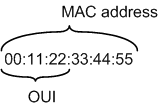
While there are various places where you can lookup OUIs I couldn’t find an easy command line tool for this. So, to enable easier lookups of these OUIs I wrote a small Perl script, the script is made to be used on a BackTrack 4 installation, however it should work on other systems as well.
The script uses the OUI file which comes with the aircrack-ng suite. On BackTrack 4 this file is located at /usr/local/etc/aircrack-ng/airodump-ng-oui.txt, this variable ($ouifile) can be adjusted in the beginning of the script.
The script:
#!/usr/bin/env perl
# MAC address OUI checker
# Thijs (Thice) Bosschert
# http://www.thice.nl
# v0.4 25-06-2010

$ouifile = "/usr/local/etc/aircrack-ng/airodump-ng-oui.txt";

# Print header
print "\n  MAC address OUI checker v0.4\n".
        "  by Thijs (Thice) Bosschert\n\n";

# Check if argument has been given
if (!$ARGV[0]) {
        fatal_error();
}

# Removing seperators from MAC address and uppercase chars
my $OUI = uc($ARGV[0]);
$OUI =~ s/[^0-9A-F]//g;

# Get OUI from MAC
if ($OUI =~ /^([0-9A-F]{6})/) {
        $OUI = $1;
        print "  Checking OUI: ".$OUI."\n";
} else {
        fatal_error();
}

# Open OUI file from aircrack-ng
open(my $fh, "<", $ouifile) || die "  Error: Can not access OUI file: $ouifile";
while (<$fh>) {
        ($checkoui,$company) = split(/\(hex\)/,$_);
        $checkoui =~ s/[-|\s]//g;
        # Check if OUI can be found in the list
        if ($OUI eq $checkoui) {
                $company =~ s/\t//g;
                chomp($company);
                # Output found OUI
                print "  Found OUI: ".$OUI." - ".$company."\n\n";
                exit;
        }
}
close($fh);

# Show if OUI was not found
print "  Could not find OUI: ".$OUI."\n\n";

# Error messages
sub fatal_error {

        print "  Error: No MAC address or OUI specified or could not recognize it.\n";
        if ($0 =~ /^\/bin\/(.*)/) {
                print "  Usage: $1 \n";
        } else {
                print "  Usage: perl $0 \n";
        }
        print "  MAC can be submitted as:\n".
                "                001122334455\n".
                "                00:11:22:33:44:55\n".
                "                00-11-22-33-44-55\n".
                "        OUI can be submitted as:\n".
                "                001122\n".
                "                00:11:22\n".
                "                00-11-22\n\n";
        exit;
}
To have easier access to the script, you can install the script to the bin directory by the following two commands (as root or sudo):
cp OUI_lookup.pl /bin/OUI_lookup
chmod +x /bin/OUI_lookup
Some example outputs of the script:
thice@bt:~$ OUI_lookup

  MAC address OUI checker v0.4
  by Thijs (Thice) Bosschert

  Error: No MAC address or OUI specified or could not recognize it.
         Usage: OUI_lookup
         MAC can be submitted as:
                 001122334455
                 00:11:22:33:44:55
                 00-11-22-33-44-55
         OUI can be submitted as:
                 001122
                 00:11:22
                 00-11-22
thice@bt:~$ OUI_lookup 001122

  MAC address OUI checker v0.4
  by Thijs (Thice) Bosschert

  Checking OUI: 001122
  Found OUI: 001122 - CIMSYS Inc
thice@bt:~$ OUI_lookup 22-33-44

  MAC address OUI checker v0.3
  by Thijs (Thice) Bosschert

  Checking OUI: 223344
  Could not find OUI: 223344
thice@bt:~$ OUI_lookup 00:11:00:22:00:33

  MAC address OUI checker v0.3
  by Thijs (Thice) Bosschert

  Checking OUI: 001100
  Found OUI: 001100 - Schneider Electric
To update the aircrack-ng OUI file you can run the command “airodump-ng-oui-update”
root@bt:~# airodump-ng-oui-update
[*] Downloading IEEE OUI file...
[*] Parsing OUI file...
[*] Airodump-ng OUI file successfully updated
Any feedback on this script is much appreciated, the script can be used and adjusted by anyone, as long as a reference to this site (Thice.nl) is included.
I hereby would like to thank user Gitsnik of the BackTrack Forums for providing me feedback and some improvements to my code.


Leave a Reply